


Rhythm Tiles: Pop Songs
4.671.00 Reviews
App Specs
- Version
- 0.2.7
- Updated On
- License
- Free
- Downloads
- 5,000,000+
- Developer
- Agile Lion Games
- Categories
- Casual
- Platform
- Android
Screenshots


 Analysis by AppCompare
I tend to enjoy rhythm games most when they make a simple action feel musical rather than merely testing how quickly I can react. Rhythm Tiles: Pop Songs is built around that appeal: you follow the beat by tapping tiles, with pop music giving each short session its pulse. It is a casual game from Agile Lion Games, and its straightforward premise makes it easy to understand before you decide whether the timing challenge suits you.
A quick first impression, with a clear trade-off
The central appeal is immediacy. There is no complicated rulebook to learn before you can try keeping time, so this is the kind of game I would consider when I have a spare moment and want something more active than scrolling. The flip side is that a simple input can only stay interesting if the music, timing and changing challenge hold my attention. If I want a story, a long-term character build or a puzzle that rewards careful planning, I would choose a different kind of game.
It is free, has an Everyone age rating, and has reached over a million installs. Its average rating is 4.5 from around two thousand ratings, with 28 written reviews. Those figures suggest a sizeable audience and a generally positive reception, but they do not tell me whether I will enjoy the feel of a particular song or the speed of a particular sequence. I would treat the ratings as a useful starting point, then judge the game by whether its rhythm-focused play fits my own taste.
How the visual mood supports play
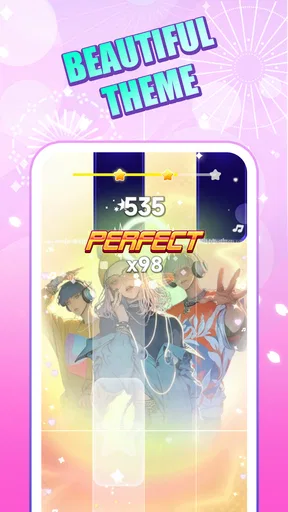
From the moment you open Rhythm Tiles: Pop Songs, you're greeted with a sleek and vibrant interface that screams "let's have fun!" The design is intuitive, so even if you're not a seasoned gamer, you can dive right in without a hitch. I love how the game balances simplicity and style—it's easy on the eyes but packed with personality.
For a tile-based rhythm game, that kind of visual clarity matters more than decoration alone. Your attention has to stay on the incoming prompts and the timing, not wander around trying to decipher the screen. I would also pay attention to whether the colours remain comfortable in a dim room; bright, energetic visuals can help create a pop-game mood, but they can feel intense if you are playing late or for a long stretch. A short session is a sensible way to see whether the presentation works for you.
When the beat becomes the main event
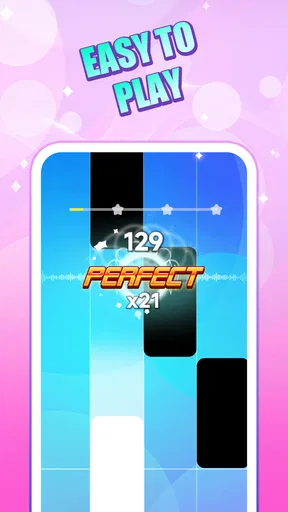
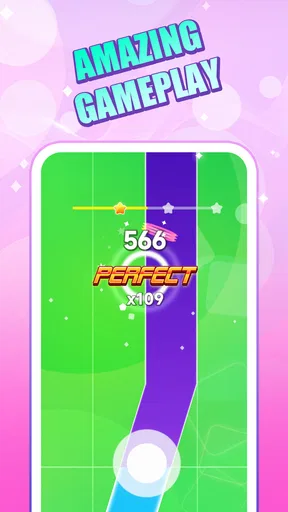
Now, let’s talk gameplay. The concept is straightforward: tap the tiles in time with the music. But don’t be fooled; it’s not as easy as it sounds! The tiles move quickly and the beats come fast, demanding quick reflexes and a keen ear. It’s like a dance party for your fingers!
Listening closely and finding your timing
One of the standout features of this app is its stellar music selection. As the name suggests, you’ll be tapping along to some of the hottest pop songs. Whether you’re into chart-toppers or indie gems, there's something for everyone. The tracks are well-chosen and sound fantastic, adding an extra layer of enjoyment to the gameplay. I found myself getting lost in the music more than once, which is always a good sign.
Worth Reading Before You Choose

Switching to Android Auto Means Rethinking Your Driving Routine

Google Calendar Makes a Crowded Week Easier to Manage

Baby Panda World Brings Quick Play to Modern Phones, but Its Game Library Feels Busy

ESPN’s Live Game View Makes Following Close Games Easier

QuizzLand Review: A Good Fit for Short Trivia Breaks, Not Every Player

Basketball Stars: Multiplayer Is Fast, but Can It Recover When Matches Go Wrong?
In practice, I find it helps to listen for the pulse rather than chase every tile with my eyes. If I focus only on the visual stream, I can end up reacting late; using the beat as an audio cue makes each tap feel less like guesswork. Headphones can make that listening strategy easier in a noisy place, though they are not essential if you can hear the game clearly. This is also why I would not start a new, faster section while distracted: the game asks for both attention and timing, even though the controls sound simple.
Pacing, progression and the limits of a quick session
The game offers a variety of levels that increase in difficulty as you progress. It’s a satisfying climb from easy to challenging, and each level feels like a new adventure. The sense of achievement when you nail a particularly tricky sequence is incredibly rewarding. Plus, there are daily challenges that keep things fresh and exciting, giving you a reason to come back every day.
That rising challenge can make a brief play break surprisingly absorbing. I would set a natural stopping point before starting—one level or a daily challenge, for example—because a rhythm game can make “one more try” feel tempting when I nearly get a sequence right. If repeated attempts stop feeling satisfying, stepping away is better than treating a missed run as a problem to solve at all costs. The pleasure here is in matching the music, not turning every session into a score chase.
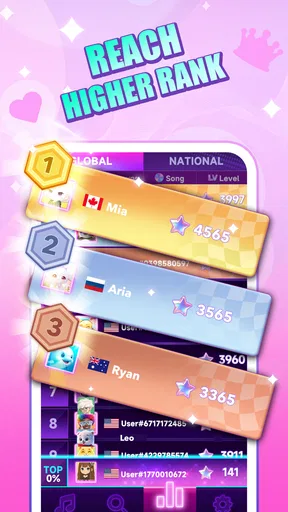
Another cool feature is the leaderboard. Competing against friends or players worldwide adds a competitive edge to the fun. It’s always a thrill to see your name climb up the ranks!
Leaderboards are most enjoyable when I use them as a personal nudge rather than the main measure of whether I am improving. A score can motivate another attempt, but it can also shift attention away from the song and toward comparison. If competition is not your thing, the basic appeal remains the rhythm challenge itself; you do not need to care about rankings to understand why tapping along can be satisfying.
Personal touches and what they change
Customization is another area where the app shines. You can personalize your tiles with different themes and colors, which is a nice touch. It allows you to make the game feel more "you," which I always appreciate. Also, the app regularly updates with new songs and themes, ensuring that the experience never gets stale.
Changing a theme is more than a cosmetic decision in a game where you follow moving tiles. I would choose a contrast that is easy for me to read instead of picking a colour combination just because it looks striking in a screenshot. That small adjustment can reduce visual strain during faster passages and help keep my attention on the beat. If I tend to play in short bursts, I would leave a familiar theme in place; if the screen starts feeling visually repetitive, a different look can make returning feel a little fresher without changing the core challenge.
The developers have also thrown in some extras like power-ups and bonuses that can help you out of a tight spot. These little perks add a strategic element to the game, making it even more engaging.
For me, these extras are best treated as support rather than a substitute for learning the timing. If I rely on a bonus every time a sequence gets difficult, I miss the satisfaction of settling into the rhythm and improving my own consistency. On the other hand, they can make a rough stretch less discouraging, especially when I am playing casually and do not want one mistake to end the fun. That balance between practicing the beat and using a helping hand is part of deciding how seriously to approach each run.
Where it fits among other rhythm games
Compared with music games that centre on long sessions, elaborate instrument-style controls or broad progression systems, this one is easier to approach as a quick tap-along. That simplicity is an advantage when I want an uncomplicated challenge, but it also means players looking for more control over a performance or a deeper competitive scene may prefer a different rhythm title. Likewise, if discovering a large range of genres is the main reason you play music games, a pop-focused choice may not match your listening habits as well as a broader music library elsewhere.
A realistic use for me would be a short break at home: I could play a level, try the daily challenge, and then put the phone down before the session expands into a long run of retries. On a commute, I would only play when I can give the screen and sound my attention; tapping while walking or doing another task is a poor fit for a game that relies on timing. If you are choosing something for quiet public spaces, consider whether you can comfortably hear the beat without disturbing anyone around you.
It is also worth checking how it feels on your own device before settling in for a longer session. The current version is 0.1.2 and the minimum Android requirement is 7.0, so compatibility is straightforward to assess for an Android phone. Since this is a timing game, a responsive screen and a comfortable grip matter more to my enjoyment than they would in a slower puzzle game. If taps seem inconsistent, I would first try a calmer setting, hold the device steadily and focus on the beat before deciding the game itself is not for me.
Who I would recommend it to
I would point casual players toward it if they like pop music, quick rounds and a challenge that asks for attention without asking them to learn a complicated control scheme. It can also work for someone curious about rhythm games who wants to try tapping along before committing to a more demanding title. The combination of music, tile timing and optional competition gives different kinds of players a reason to test it, whether they are chasing a better run or simply enjoying a song.
I would skip it if fast visual prompts make you uncomfortable, if you prefer games that can be played almost entirely without sound, or if you want deep customisation of the music itself. It is also not the option I would pick when I need a truly hands-free distraction: the central mechanic depends on watching and tapping at the right moment. Those are not faults so much as limits of the format, and knowing them in advance helps set the right expectation.
My final take on its atmosphere
So, what makes Rhythm Tiles: Pop Songs a must-download? For starters, it’s just plain fun. It’s perfect for quick bursts of entertainment when you have a few minutes to spare, but it’s also addictive enough to keep you playing for hours. The combination of fast-paced gameplay and a killer soundtrack is a winning formula.
Whether you’re looking to improve your rhythm skills or just want a new way to enjoy your favorite pop hits, this app delivers on all fronts. It’s a delightful blend of music and gaming that’s sure to keep you entertained. So go ahead, tap into the rhythm and let the music guide you!
Ready to join the rhythm revolution? Download Rhythm Tiles: Pop Songs today and let the fun begin!
Pros
- Engaging gameplay with popular songs.
- Intuitive controls enhance user experience.
- Regular updates with new tracks.
- Visually appealing graphics and animations.
- Offline mode available for on-the-go play.
Cons
- Limited free song selection.
- Contains in-app purchases.
- Ads can be intrusive at times.
- Requires high device storage.
- No multiplayer mode available.
FAQs for Rhythm Tiles: Pop Songs
What is the main objective of Rhythm Tiles: Pop Songs?
Rhythm Tiles: Pop Songs is a music-based game where players tap on tiles in sync with popular pop songs. The aim is to hit the tiles accurately and maintain the rhythm to achieve high scores. It’s a fun way to enjoy music while testing your reflexes and timing skills.
Is Rhythm Tiles: Pop Songs free to play?
Yes, Rhythm Tiles: Pop Songs is free to download and play. However, it may offer in-app purchases for additional features such as unlocking premium songs, removing ads, or accessing special game modes. These purchases are optional and not necessary to enjoy the core gameplay.
What are the system requirements for Rhythm Tiles: Pop Songs?
Rhythm Tiles: Pop Songs is designed to run smoothly on most modern Android and iOS devices. It typically requires Android 5.0 or later and iOS 10.0 or later. Ensure your device has sufficient storage space and a stable internet connection for the best experience, especially for downloading new songs.
Can I play Rhythm Tiles: Pop Songs offline?
While the core gameplay of Rhythm Tiles: Pop Songs can be enjoyed offline, certain features like downloading new songs or accessing leaderboards require an internet connection. For a fully immersive experience, it's recommended to have occasional online access to update content and compete with friends.
How does Rhythm Tiles: Pop Songs handle updates and new content?
Rhythm Tiles: Pop Songs regularly updates its song library with new pop hits to keep the game fresh and engaging. Updates are automatically prompted via the App Store or Google Play, ensuring you have access to the latest songs and features. Be sure to enable automatic updates for seamless access.


